
.quickedit{ display:none; }
Selamat datang di blog yang sederhana ini....Terimakasih Atas kunjungan Anda diblog ini...!! Semoga Anda tidak bosan dengan isi Blog ini dan Anda bisa kembali berkunjung lagi.

Rabu, 16 Mei 2012

How to fix error 0xc4eb841a on HP Printers

Solution:

1. Open the front door of the printer.

2. Remove the cartridges and close the cover.

3. Turn off the printer and remove the power cords and USB back.

4. With the printer off, press the power button for 10 seconds.

5. Reconnect the power cord and turn on the printer.
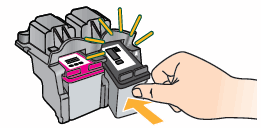
6. Replace the cartridges.

Reconnect USB cable

If error persiste, contact HP Support.

How to reset waste ink on Canon MX318


Turn off the printer.
Press and hold the RESUME button, then press and hold the POWER (or Stop/reset) button.
Still holding the POWER (or Stop/reset) button, Release the RESUME button, Next press and release the RESUME button 2 more times in succession. The printer will enter the"Service Mode".
Press the RESUME button 4 times, this will select the clear waste ink counter function.
Press the POWER (or Stop/reset) button to "set" the change, and return to the top of the function selection menu.
Press the POWER (or Stop/reset) button again to restart the printer
Adhe edogawa.

Check Page Rank Blog/Web site Anda disini:

This page rank checking tool is powered by Page Rank Checker service

Like Facebook

Pengikut