


1. Open the front door of the printer.

2. Remove the cartridges and close the cover.

3. Turn off the printer and remove the power cords and USB back.

4. With the printer off, press the power button for 10 seconds.

5. Reconnect the power cord and turn on the printer.
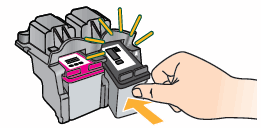
6. Replace the cartridges.
Reconnect USB cable
If error persiste, contact HP Support.


.jpg)


